How to present a brand identity with a bento grid
By Jakaria Mahmud, brand identity designer ·
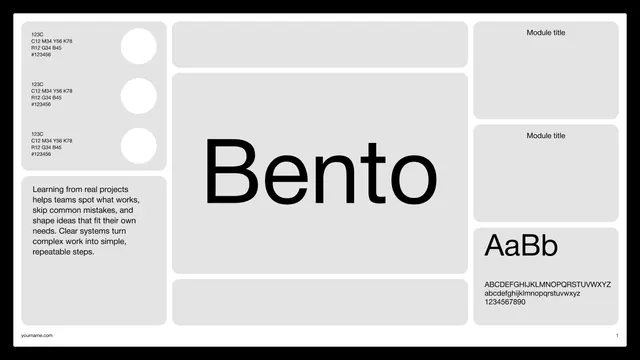
A bento grid shows a whole brand identity on one screen. Logo, colour, type, imagery and voice sit in tiles of different sizes, like the compartments of a bento box. Clients understand it in seconds, and it is the image people share on Behance, Dribbble and LinkedIn.
Short answer: pick a canvas size for where the board will be seen, give the logo or a hero image the largest tile, add one tile each for colour, type and a brand moment, keep a single gap size, and limit the board to the five or six things that make the brand recognisable.
Why designers use bento grids for branding
- Fast approval. A client sees the whole system before reading a 40 page guideline.
- Shareable. One image works as a case study cover, a social post and a pitch slide.
- Honest. If a tile looks weak next to the others, the identity needs more work. The grid exposes gaps.
1. Choose the canvas for where it will live
| Where it is shown | Canvas |
|---|---|
| Slides, website case study header | 1920 × 1080 (16:9) |
| Behance and Dribbble shots | 1600 × 1200 (4:3) |
| Instagram and LinkedIn posts | 1080 × 1080 (1:1) |
| Full system in one scroll | About 1440 wide, 2000 to 3300 tall |
2. Plan the tiles before you design
Write the list first. A strong brand board usually has:
- A hero tile with the logo on its main colour, or a key image.
- A logo tile on a light and a dark background.
- Two to four colour tiles with HEX, RGB and CMYK values.
- A type tile that shows the typeface name, weights and a short specimen.
- One brand moment: a product shot, an app screen, signage or packaging.
- Optionally, a line of brand voice or the tagline.
3. Build the grid with one gap and one radius
Use a 12 column layout with one gap size (16 to 24 px on a 1920 canvas) and one corner radius for every tile. Make the hero tile span about half the width. Mixing gap sizes is the most common reason a bento board looks messy.
4. Let colour do the structure
Put the primary colour on the biggest tile, secondary colours on mid tiles and neutrals behind type. If every tile is a different bright colour, nothing leads. Check text contrast on every tile.
5. Show real usage, not only swatches
At least one tile should show the brand in use. A business card, an app screen or a storefront makes the identity feel real and helps the client picture it.
6. Export for each channel
Export PNG at 2x for screens. For Instagram, export a square crop of the same board. Keep the source frame in Figma so you can update colours later through variables.
Common mistakes
- Too many tiles. Ten small tiles read as noise; six clear ones read as a brand.
- Tiny type. Colour codes and labels must be readable when the board is scaled down in a feed.
- No hierarchy. One tile must clearly be the most important.
- Only swatches. Without a real application, the board does not sell the idea.
Start from a template
Drafter has 64 bento grid templates for Figma: full brand boards, 16:9, 4:3 and square layouts in many colourways. Six are free, including the R-load brand board and the Mono Studio bento. When the board is approved, document the full system with a brand guideline template, and see all branding templates in one place.
Questions
What is a bento grid in branding?
A layout of rectangular tiles in mixed sizes on one shared grid, used to show a brand's logo, colours, typefaces, imagery and key messages together on a single board.
What size should a bento brand board be?
Use 1920 × 1080 for slides and case study headers, 1600 × 1200 for Behance and Dribbble shots, 1080 × 1080 for Instagram, and a tall board around 1440 wide when you want to show the full system in one scroll.
How many tiles should a bento grid have?
Six to ten tiles is enough for most brands. One large hero tile, a logo tile, two or three colour tiles, a type tile and one or two tiles for imagery or a message.
Is a bento board a replacement for brand guidelines?
No. A bento board is a summary that sells the identity at a glance. The brand guideline is the full rulebook with clear space, misuse, codes and applications. Most projects need both.
Can I get a free bento grid template?
Yes. Drafter has six free bento templates for Figma, including two full brand boards, with a free account.